Markdown Editor
A free, open markdown editor for Mac
I wanted Typora's one-pane editing without the price tag, so I built a small native version. Markdown renders in place as you type, and any folder you drop on it opens as a file tree. No account, no vault.
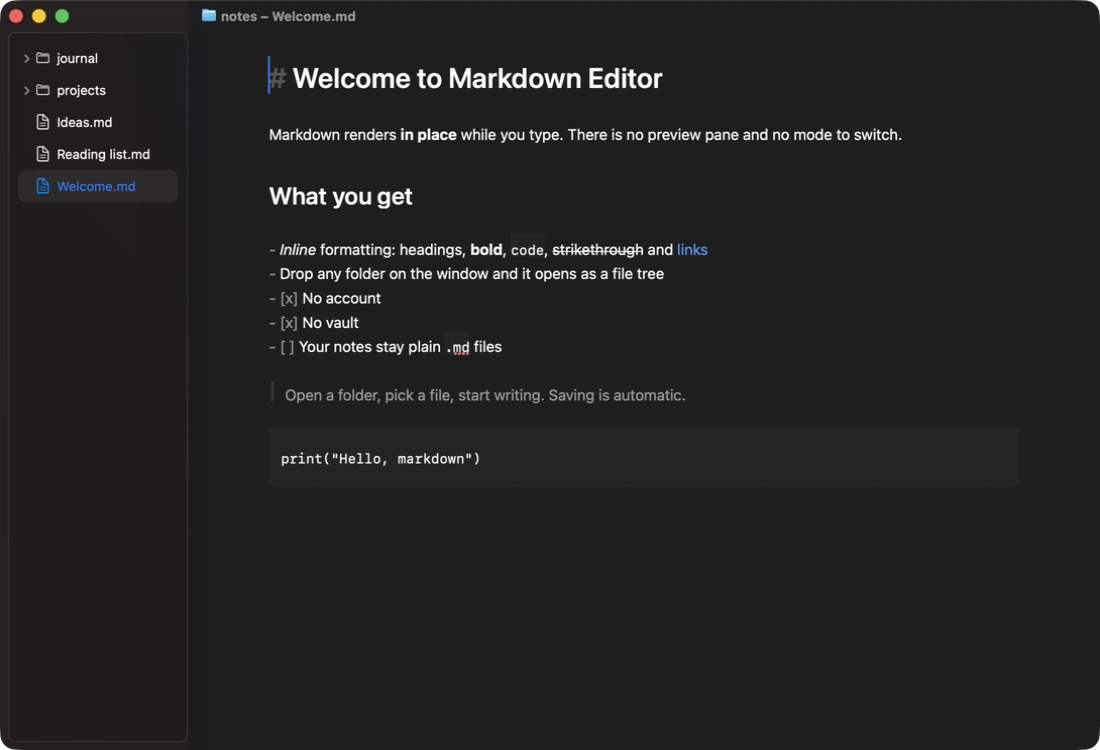
Inline editing
Headings, bold, links, lists and code render as you type. One pane, no preview toggle.
Drop a folder to open it
Drag any folder onto the window or the Dock icon. Your notes stay plain .md files where they are.
Free and open
No price, no account, no tracking. The source is MIT-licensed.
First launch
The app is signed ad-hoc, not with an Apple Developer ID, and not notarized, so macOS blocks the first launch. You allow it once:
- Unzip the download (Safari may do this for you) and move Markdown Editor to Applications.
- Double-click it. macOS shows “Markdown Editor” Not Opened. Click Done, not Move to Trash.
- Open System Settings › Privacy & Security and scroll down to Security. Next to “Markdown Editor” was blocked to protect your Mac, click Open Anyway. The button shows for about an hour after you try to open the app.
- Confirm in the warning that follows, then enter your login password or use Touch ID.
After that it opens like any other app.
Please don’t run xattr -dr com.apple.quarantine on it, even though some sites
suggest it. That skips the malware check macOS runs on first launch. If you’d rather not trust a
download, build it from the source instead.
Check the download
SHA-256 of Markdown-Editor.zip:
952815d7f0acb6c6e03c00d61569088355d201d230385e571a108520a52cbd44
In Terminal, from the folder the zip is in:
echo "952815d7f0acb6c6e03c00d61569088355d201d230385e571a108520a52cbd44 Markdown-Editor.zip" | shasum -a 256 -c